

As of 18 November 2026, Dolvero allows automated trading on both of its challenge types, and on both the bot needs approval before its first trade. On CFD challenges you may run an Expert Advisor on MetaTrader 5 once it has passed a compliance review. On Crypto challenges, bots, including third-party and commercial tools, are permitted with prior approval: you open a ticket in the app before the bot trades. On both, the bot trades under the same rules and the same monitoring as a person.
That answers the question for Dolvero only. Firms differ, and so do programs inside one firm, so below you will find why firms restrict bots, the three things to check on any rules page before you pay, and exactly what Dolvero's rules say today.
- Firms restrict bots mainly because automation makes copy trading, account coordination and latency tricks cheap to run. Bots as such are rarely the target.
- Before paying any firm, check three things: whether an EA needs approval, what the VPS and location rule says, and whether the bot is monitored like a manual trader.
- Dolvero CFD challenges: EAs on MetaTrader 5 after a compliance review. Dolvero Crypto challenges: all forms of automation, with prior approval through a ticket in the app.
- Copy trading, coordinated accounts, latency or feed arbitrage and automated high-frequency execution are not allowed on any program.
- Where Dolvero stands out: one defined approval step on every program, a published answer for every one of these questions, and a Trading Rules Agreement that fixes the text for your account.
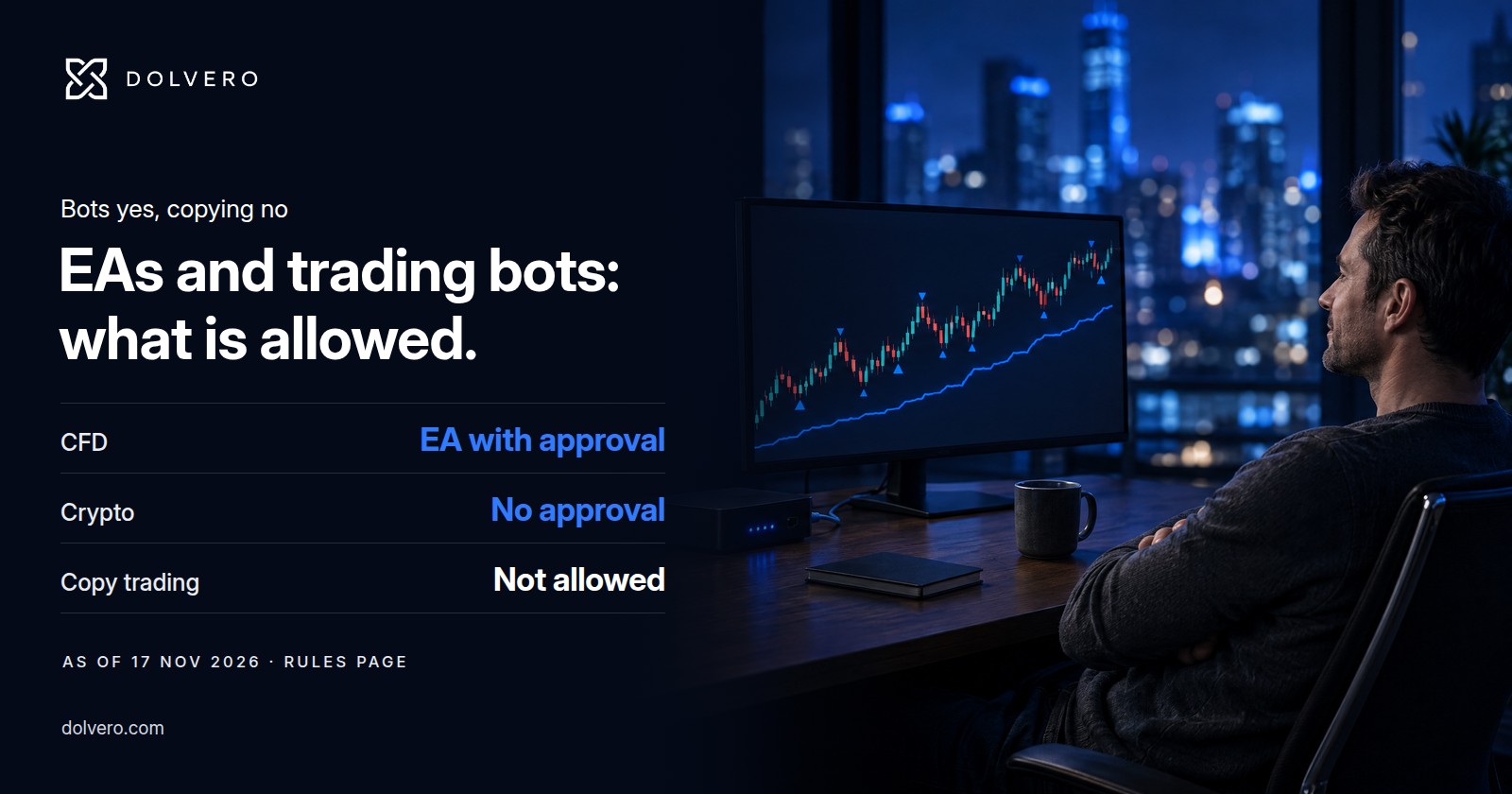
- CFD challenges
- EA with approvalMetaTrader 5, rules page, 18 Nov 2026
- Crypto challenges
- Approval firstticket in the app before the bot trades
- Copy trading
- Not allowedon every program
Why firms restrict bots
A prop firm judges an account by the trading decisions behind it. A bot does not change what a good decision is, but it changes what is cheap to do. Three things explain most bot rules.
Copy trading. One signal can be pushed to many accounts at once. If a hundred accounts open the same trade in the same second, the firm is no longer looking at a hundred traders. It is looking at one.
Latency and feed tricks. A fast program can try to profit from a delay in a price feed instead of from a view on the market. That is not what an evaluation is meant to measure.
Coordination. Software makes it easy to run mirrored or offsetting positions across several accounts, so that whatever the market does, one of them passes.
Notice that all three are about what the bot is used for, not about automation itself. That is why the same firm can welcome a rule-based strategy running on one account and end an account that mirrors a signal.
What to check on any firm's rules page
- Approval. Search the page for "Expert Advisor", "EA", "bot" and "automated". Note whether approval is needed before the first trade, who gives it, and which program the answer belongs to.
- VPS and location. Many EA users run the bot on a VPS. Find out whether a VPS is allowed at all, whether it needs a dedicated IP, and whether you must tell the firm before you start. A blanket ban on VPNs and proxies is common, and a VPS is a different thing, but only the rules page can say how a given firm treats it.
- Same monitoring as manual. Look for the sentence that says automated trades are held to the same risk limits and prohibited-strategy rules as manual ones. If it is missing, ask.
Then read the prohibited list for your program, because that is where bots usually fail. Our guide to how to identify a legitimate prop firm shows how to read a rules page quickly, and the consistency rule calculator helps you test a bot's results against a consistency cap before you buy.
How Dolvero handles EAs and bots
| Program | EAs and bots | Approval | Same rules as manual |
|---|---|---|---|
| CFD challenges (MetaTrader 5) | Expert Advisors allowed | Pre-approval by compliance review | Yes, the EA must keep all risk rules |
| Crypto challenges (Bybit) | All forms of automation permitted | Prior approval through a ticket in the app (Terms 6.2) | Yes, same monitoring, risk limits and prohibited strategies |
On CFD, send the EA for review before it trades. Once it is approved, the EA is bound by the same risk rules as you are, including the daily loss limit and the drawdown limit, and on evaluations the 2 % maximum risk per trade.
On Crypto, open a ticket in the app before the bot trades, and run the bot yourself on your own account. Once it is approved, it has to keep every other rule: no latency exploits, no copy feeds, no cross-account coordination. The Crypto challenge page has the program parameters.
What is not allowed, with or without a bot
- Copy trading and external signals on every program: replicating trades from a signal service, a Telegram or Discord group, a commercial feed or a mentor account. It ends the account immediately.
- Account coordination: mirroring positions, splitting risk or running the same strategy across several accounts, your own or other people's.
- Latency and feed arbitrage, and strategies built on server latency, feed delays or connection speed.
- Automated high-frequency execution (HFT), which the rules page lists as not allowed.
- Hedging: offsetting positions on the same or a correlated instrument.
- On Crypto challenges, the rules page also lists doubling up after a loss (a chain of three or more trades where each loss is followed by a position at least twice the size on the same instrument and direction) and grid or layering entries that add against the price to average down a loss. Many bots are built that way, so test yours against the list.
- Somebody else trading your account. Only the account holder may trade it.
Each of these has a reason. They keep an evaluation measuring one trader's decisions, and they keep funded accounts from carrying risk that has nothing to do with a market view. The full wording sits on the rules page, and the Trading Rules Agreement you sign fixes the text for your account.
Where Dolvero stands out
For a trader with a bot, the useful thing is a clear answer before paying. Here, both programs have one defined step before a bot trades: a compliance review of the EA on CFD and a ticket in the app on Crypto, and both answers are on a public rules page you can read before paying. Prices are on the challenge page, so you know the cost of testing your bot before you commit.
Frequently asked questions
Does Dolvero allow EAs?
Yes. On CFD challenges, Expert Advisors are allowed on MetaTrader 5 after compliance approval. On Crypto challenges, automation is permitted with prior approval through a ticket in the app. Rules checked 18 November 2026 on the rules page.
Do I need approval for my bot?
Yes, on both programs. On CFD challenges, submit the EA for compliance review before it trades. On Crypto challenges, open a ticket in the app before the bot trades. In both cases the bot has to keep all risk and strategy rules.
Can I use a VPS?
A VPN, proxy or any service that masks your real IP or location is prohibited on every Dolvero account. A private VPS with a dedicated IP used to run an approved Expert Advisor is allowed: request approval through a ticket in the app before first use. For a Crypto bot on a VPS, open a ticket in the app before first use and we confirm your setup in writing. For any other setup, ask through a ticket in the app first.
What is not allowed?
Copy trading and external signals, account coordination, latency or feed arbitrage, automated high-frequency execution and hedging are not allowed. Copy trading and coordination end the account. The full list per program is on the rules page.
Check your bot against the exact rules
The rules page lists every limit per program, so you can test a strategy before you pay for a challenge.
- Dolvero: rules page and FAQ (EA and bot answer, VPN and VPS answer, prohibited strategies, Crypto prohibited list), Trading Rules Agreement